
Explore the latest in AI-powered cybersecurity capabilities announced at Microsoft Secure. Watch on demand > Read the announcement >
Azure Active Directory is now Microsoft Entra ID
New name, same powerful capabilities.

5 ways to secure identity and access in the age of AI.
Help your organization be better prepared for the opportunities and challenges ahead by adopting a comprehensive defense-in-depth strategy that spans identity, endpoint, and network.
Manage and protect with Microsoft Entra ID
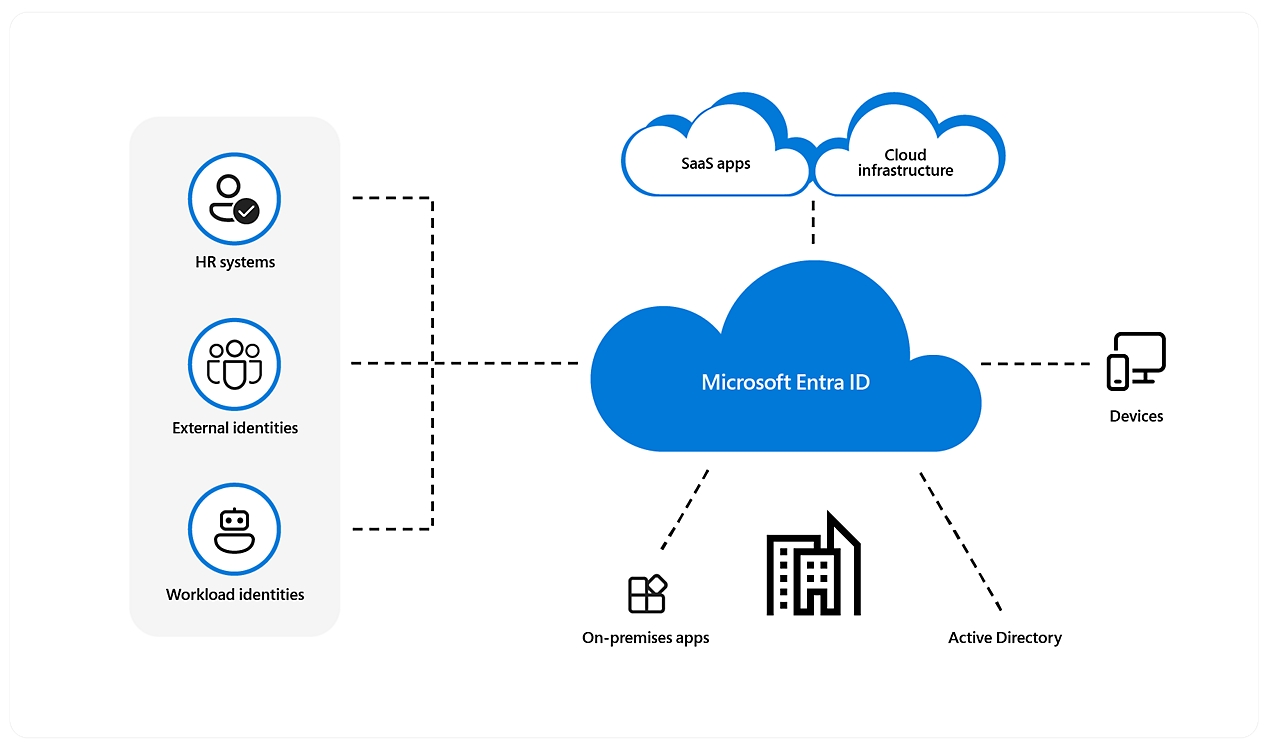
Safeguard your organization with a cloud identity and access management solution that connects employees, customers, and partners to their apps, devices, and data.

Secure adaptive access
Protect access to resources and data using strong authentication and risk-based adaptive access policies without compromising user experience.

Seamless user experiences
Provide a fast, easy sign-in experience across your multicloud environment to keep your users productive, reduce time managing passwords, and increase productivity.

Unified identity management
Manage all your identities and access to all your applications in a central location, whether they’re in the cloud or on-premises, to improve visibility and control.
Comprehensive capabilities
?resMode=sharp2&op_usm=1.5,0.65,15,0&wid=1920&hei=1090&qlt=100&fit=constrain)
App integrations and single sign-on (SSO)
Connect your workforce to all your apps, from any location, using any device. Simplify app access from anywhere with single sign-on.
Passwordless and multifactor authentication (MFA)
Help safeguard access to data and apps and keep it simple for users. Provide ease of use without the inherent risk of passwords.
Conditional access
Apply the right access controls to strengthen your organization’s security.
Identity protection
Automate detection and remediation of identity-based risks.
Privileged identity management
Strengthen the security of your privileged accounts.
End-user self-service
Help your employees securely manage their own identity with self-service portals including My Apps, My Access, My Account, and My Groups.
Unified admin center
Confidently manage all Microsoft Entra multicloud identity and network access solutions in one place.
Multicloud identity and access management
Microsoft Entra ID is an integrated cloud identity and access solution, and a leader in the market for managing directories, enabling access to applications, and protecting identities.
Consistently recognized as a Leader by industry analysts

Microsoft recognized for seventh year

A leader in access management
Learn why KuppingerCole rates Microsoft a strong positive across all product and leadership dimensions in access management.3

2022 Company of the Year for Global Identity and Access Management
Frost & Sullivan has named Microsoft the 2022 Company of the Year for the Global Identity and Access Management industry.4
See why more than 300,000 organizations use Microsoft Entra ID
Get started with Microsoft Entra ID
Microsoft Entra ID P2
Get comprehensive identity and access management capabilities including identity protection, privileged identity management, and self-service access management for end users. Azure AD Premium P2 is now Microsoft Entra ID P2.
Microsoft Entra ID P1
Get the fundamentals of identity and access management, including single sign-on, multifactor authentication, passwordless and conditional access, and other features. Azure AD Premium P1 is now Microsoft Entra ID P1.
The free edition of Microsoft Entra ID is included with a subscription of a commercial online service such as Azure, Dynamics 365, Intune, Power Platform, and others.
Identity and access management
-
Microsoft Entra ID (formerly Azure Active Directory)
Manage and protect users, apps, workloads, and devices.
-
Microsoft Entra ID Governance
Protect, monitor, and audit access to critical assets.
-
Microsoft Entra External ID
Provide your customers and partners with secure access to any app.
-
Microsoft Entra Domain Services
Manage your domain controllers in the cloud.
New identity categories
-
Microsoft Entra Verified ID
Issue and verify identity credentials based on open standards.
-
Microsoft Entra Permissions Management
Manage identity permissions across your multicloud infrastructure.
-
Microsoft Entra Workload ID
Help apps and services to securely access cloud resources.
Network access
-
Microsoft Entra Internet Access
Secure access to internet, software as a service, and Microsoft 365 apps.
-
Microsoft Entra Private Access
Help users to securely connect to private apps from anywhere.
Additional resources for Microsoft Entra ID
Azure AD is now Microsoft Entra ID
Microsoft Entra ID is the new name for Azure AD. All licensing and functionality remain the same. No action is required from you.
Microsoft Entra blog
Stay up to date with the latest news about identity and network access product.
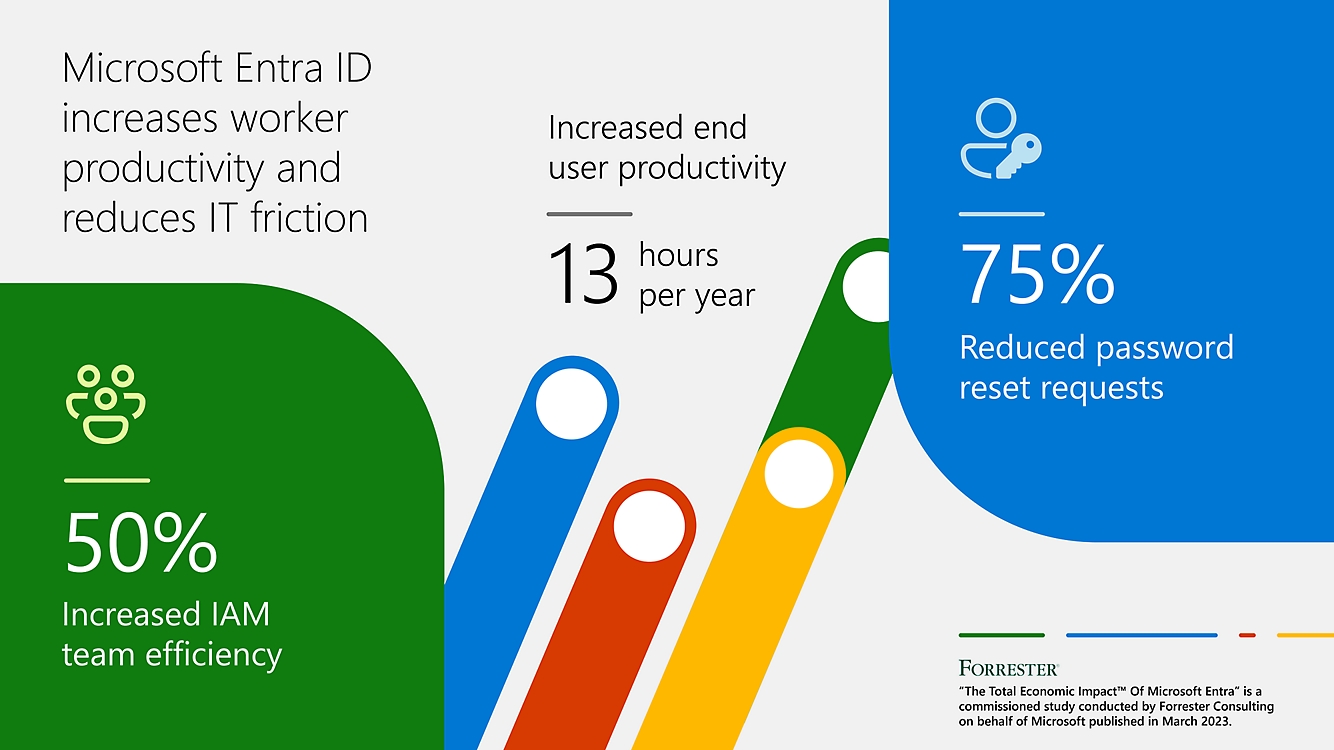
The Total Economic Impact™ of Microsoft Entra
Learn how an organization achieved a three-year 240% ROI with Microsoft Entra in this 2023 commissioned Forrester Consulting study.5
Technical documentation
Explore all the features in Microsoft Entra ID, and view how-to guides, tutorials, and quick-start guides.
Frequently asked questions
-
Azure Active Directory (Azure AD), now known as Microsoft Entra ID, is an identity and access management solution from Microsoft that helps organizations secure and manage identities for hybrid and multicloud environments.
-
Azure AD, now known as Microsoft Entra ID, has a free edition that provides user and group management, on-premises directory synchronization, basic reports, self-service password change for cloud users, and single sign-on across Azure, Microsoft 365, and many popular SaaS apps. The free edition is included with a subscription of a commercial online service such as Azure, Microsoft 365, Dynamics 365, Intune, or Power Platform.
-
Azure AD is now known as Microsoft Entra ID, but the licenses and service plans remain the same—Free, P1, and P2.
-
The new name for Azure AD is Microsoft Entra ID. The name is changing, but the capabilities, licensing, and pricing remain the same. No action is required for existing customers.
-
The name changed. Microsoft offers and supports the capabilities and service level agreements of Azure AD under the new name of Microsoft Entra ID, which was announced on June 20, 2023.
Get started
Safeguard your organization with a seamless identity and access management solution.

- [1] Gartner does not endorse any vendor, product or service depicted in its research publications and does not advise technology users to select only those vendors with the highest ratings or other designation. Gartner research publications consist of the opinions of Gartner’s research organization and should not be construed as statements of fact. Gartner disclaims all warranties, expressed or implied, with respect to this research, including any warranties of merchantability or fitness for a particular purpose.
Gartner is a registered trademark and service mark and Magic Quadrant is a registered trademark of Gartner, Inc. and/or its affiliates in the U.S. and internationally and are used herein with permission. All rights reserved. - [2] Gartner, Magic Quadrant for Access Management, Henrique Teixeira, Abhyuday Data, Nathan Harris, Robertson Pimentel. 16 November 2023.
- [3] KuppingerCole, Leadership Compass: Access Management 2022, Richard Hill, April 26, 2022.
- [4] Frost and Sullivan, Microsoft 2022 Company of the Year, Global Identity and Access Management Industry, 2022.
- [5] Forrester Consulting, The Total Economic Impact™ Of Microsoft Entra: Cost Savings And Business Benefits Enabled By Microsoft Entra, commissioned by Microsoft, March 2023. Results are for a composite organization based on eight organizations as stated in the linked study.
Follow Microsoft